underwater videographer course | equipment | video concepts & terminology
Video Concepts & Terminology
Before discussing specific video cameras for underwater use, or the formats available, it helps to understand some basic concepts about video.
Film, Video
The terms film and video are often mixed up and the confusion is not eased by the fact that shooting video is still often referred to as "filming". Film is a series of still pictures developed on a "film" of celluloid. Video is an encoded electronic signal that is recorded to some type of electronic media and then decoded when is it displayed.
Before the days of consumer video, waterproof housings were developed for film cameras ranging from compacts such as Super 8mm up to fully fledged cinematic cameras. Film cameras were used for the archive footage you see in productions documenting the early exploits of scuba diving pioneers such as Jacques Cousteau and Hans Haas. Film does have a special charm of its own, even at the levels that were more normally used by consumers as opposed to pros. For a charming example of Super 8 in use underwater, take a look at this delightful movie, Splash!, which Tom shot in 1982 with the waterproof Eumig Nautica Super 8 camera (note that the opening shot was Canon 1014E Super 8 camera at 60fps):
The movie industry is in a period of rapid transition from film to video, but to this day cinematic productions are still typically shot on film.
Resolution
Video is made up of dots, or pixels. The number of dots making up the picture defines the pixel resolution of the video. For example an older YouTube video would be encoded at a relatively low resolution of 320 x 240, whereas a full HD (1080p) camera records in a relatively high definition of 1920 x 1080. The higher the resolution, the sharper the image.



Since resolutions of video have increased in recent years, terms such as 2K and 4K have been commonly quoted in the industry. This simply refers to the width of the picture in units of 1024 pixels. So for example the RED One camera can record in 4K, which means the width of the picture is 4096 pixels.
Definition
Recorded and broadcast video formats are divided into two levels of definition: standard definition and high definition. The resolution of the video signal is used to categorize video into either standard or high definition, although the degree of compression of the video also plays a large part in how clear and defined the video actually looks (more on compression later). Although there are some slight variants, or my purposes, standard definition is a resolution of 720x480 (NTSC) or 720x576 (PAL). More on PAL and NTSC below. For my purposes, high definition is video at 720 or 1080 lines of resolution.
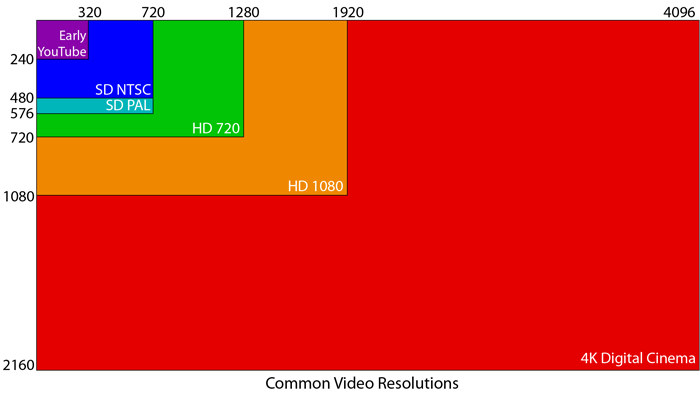
When specifying cameras and formats, the term "HD" is sometimes used to refer to the specific "full HD" resolution of 1920 x 1080, but is also used to refer to the general category of high definition, so this can lead to confusion.
The majority of the world's TV is still broadcast as standard definition. High definition broadcasting is making gradual inroads and consumers normally pay a premium for this service.
Aspect Ratio
The aspect ratio of an image, often abbreviated to as A/R or AR, is simply the ratio of the width of the picture to the height of the picture. Older consumer video formats are mostly 4:3, which means a ratio of 4 units of width to 3 units of height. Newer consumer video formats are mostly 16:9, which means a ratio of 16 units of width to 9 units of height. This is commonly termed widescreen. Cinema is even wider than this, with a typical aspect ratio of XXXXX. Screen aspect ratio SAR, display aspect ratio DAR.


In digital video we must also consider the pixel aspect ratio, or PAR. Although often the "dots" or pixels of video delivered on the internet are square, the pixels of recorded video formats are often rectangular or anamorphic, not square. In this case the PAR is quoted as a single number representing the width of the pixel divided by its height. So for example PAL DV has a not-quite-square aspect ratio of 1.XX and 1080i50 HDV has a PAR of 1.33. More about these digital formats shortly.
Picture of PAR
Frame Rate
Frame rate is the number of still frames or pictures displayed per second. Higher frame rates deliver smoother images. A web movie might be delivered at 15 frames per second, or 15 fps, or a pro video camera might record video at 30 fps. See below for interlacingLINK, which complicates the issue.
Bandwidth, Bitrate
Bandwidth is the capacity for data to be transmitted. Data rate is the amount of data transmitted over time. In the digital realm this is quoted as a bitrate in bits per second (bps), kilobits per second (kbps) or megabits per second (mbps). For example DV video is recorded at a bitrate of XX mbps. HD is recorded at XX mpbs. A web movie might be delivered at 500 kbps. Your broadband internet connection might be for example 4 mbps. Bitrate is commonly quoted as a judge of a video format's quality as much as resolution and framerate.
Interlaced, Progressive
Video can either be recorded and delivered as interlaced or progressive scan. Progressive scan simply means a succession of full frame, still pictures displayed in succession. If you flicked through a flip book you would be watching a primitive progressive scan movie. If you went to the cinema you would be watching a progressive scan movie because film is simply a series of still images projected one after another in quick succession. Cinematic film is described as 24p, where 24 denotes the frame rate and p denotes the fact that the signal is progressive.
Picture of a film strip, full frame after full frame
A video picture consists of a series of horizontal lines. For instance NTSC DV has 480 lines. In the early days of broadcast there was insufficient bandwidth available to transmit a progressive signal at the frame rate and resolution that the engineers desired. However it was discovered that the bandwidth requirement could be effectively halved by only changing half the displayed lines at once. The odd lines (1st, 3rd, 5th etc.) are termed field A or the upper field, and the even lines (2nd, 4th, 6th etc.) are termed field B or the lower field. In interlaced video displayed on a CRT display (a cathode ray tube display such as your old TV or a broadcast monitor) the electron guns "paint" the upper field first from the top left corner of the display to the bottom right corner of the display. The upper field remains on the display while the lower field is then painted. And then the next upper field is painted over the first one starting at the top left, and so on. The frame rate and resolution of TV signals are sufficient that the human eye does not notice the interlacing, and so 50i (50 frames per second, interlaced scan) appears much the same as 50p would but for half the bandwidth requirement. If one halved the data rate by recording/displaying 25p instead of 50i the effect would be slightly "steppy" on sequences of high motion.
Pic of how interlacing it painted
Quoting the full frame rate followed by "i" for interlaced video has only become widespread since the advent of high definition formats and can be confusing since previously the frame rate of only one of the fields was usually quoted along with the description "interlaced". So for example HDV's frame rate of "50i" is actually the same as PAL DV's frame rate which was usually referred to as "25 fps interlaced".
Computer displays and modern LCD or plasma TVs display progressive video, not interlaced. So if the video was originally recorded in an interlaced format it must be deinterlaced to turn it into a progressive signal, either in post-production or by the display device itself.
Post-production side-bar - Post Production: Work that is done on the video after it is recorded in the camera. Post-production is often referred to simply as "post", as in "Don't worry we'll fix it in post". Post-production includes editing the video, which these days is normally done on computers.
Interlacing was a neat visual "trick" that has lasted a very long time in the video world, but to be quite honest it is a total pain in the backside in post-production. Interlacing is gradually disappearing and in the future will likely disappear completely. The sooner I can get it out of my workflow completely the better.
To learn more about interlacing check out 100fps, or of course good old Wikipedia.
PAL, NTSC
Unfortunately before the days of global communication, the world became divided into a number of different broadcast standards. Of these by far the most common are PAL and NTSC. PAL is a resolution of 720 x 576 at 25 fps and NTSC is a resolution of 486 x 720 at the curious frame rate of 29.97 fps (note that NTSC DV only has 480 linesREASON). The NTSC camp includes the USA and Japan. The PAL camp includes China, Australia and most of Europe.
Check that funny thing about the number of lines. 706???
PAL and NTSC emblems??
Consumer video cameras are mostly divided into those that shoot PAL and those that shoot NTSC. The media that the the camera shoots on is exactly the same, so a miniDV tape purchased in Japan would work in a European tourist's camcorder. Be careful when buying online or overseas that you get the right camera for your country! High end cameras such as my Sony HVR-Z1P can be switched between PAL and NTSC, which is useful for working with it for customers from different areas.
If you asked most pros in NTSC land which format they would choose given an even choice, most would say PAL. The higher resolution of PAL more than makes up for the slower frame rate. In addition strong broadcast standards are placed on NTSC and can be difficult to comply with. NTSC is often jokingly referred to as "Never The Same Color". Film can also be more straightforwardly transferred to PAL with a slight increase in speed as the frame rates are so close.
Both PAL and NTSC can be displayed on multi-system TVs and playback equipment such as DVD players. In the PAL world the penetration of multi-system TVs is now high, meaning for example that an NTSC DVD will display correctly. However the reverse is not true. Most TVs in the USA for example will not display PAL correctly, so if you shoot with a PAL camera but are producing a DVD for the USA it must be converted to NTSC first.
Link to PAL > NTSC conversion
When the standards for high definition video were being worked out, the number of lines of video was standardized worldwide. 1080 and 720 lines are the two most common. Unfortunately however, the frame rate was not standardized because of the wish to simplify down-conversion to existing PAL and NTSC standard definition formats. As a result, the high definition broadcast standard in the PAL world is 50i and in the NTSC world it is 60i (actually it is 29.97 interlace but this is simplified to "60i")(CHECK THIS RE p AGAINST THOSE DOCUMENTS FROM DREW AND VIDEODAN). The BBC want their finished HD productions in 50i but National Geographic want them in 60i, so someone like me who is shooting for stock or their own productions still has to make a choice between frame rates. Perhaps one day in the future we can all standardize on something like 60p, but this is not going to happen any time soon. One consolation is that new playback equipment designed for high definition generally will play back video in a wide range of formats regardless of geographical location.
Overcranking, Undercranking
If you recorded an anglerfish swallowing a passing fusilier, it would all happen so fast that it's highly likely that you would want to show it in slow motion. But if you had recorded it in 30p and wanted to show it at 25% of the original speed, then you would be left with a framerate of 7.5fps, which is going to look noticeably steppy.
Slow motion video of fish attack
No amount of jiggery pokery in post production is going to be able to make that look smooth. However if you were able to record it at 120p then you could later slow it down to 25% and still show it in 30p to match the rest of your real-time footage.
In the old days of manually operated film cameras, if a scene was being shot that the director knew he would like to show at 25% of the original speed, the operator would simply crank the film around 4 times as fast as normal and so when the film is later projected the slow motion action would still look nice and smooth at the normal projected frame rate. Hence the term overcranking. which is still used now.
Higher end "prosumer" and professional video cameras allow higher frame rates which give the user scope to slow the action down later but maintain smoothness. Unfortunately because of bandwidth and storage requirements there is usually a trade-off in terms of resolution. For example the Panasonic 200 can be overcranked to 60p, but at that frame rate it can only record 720 lines as opposed to 1080 at 30p. There are also professional specifically designed for slow motion, with frame rates in the realm of 1000 fps.
Prosumer sidebar - "Prosumer" refers to the level where low-end professional equipment and top-end hobbyist gear overlap.
Embed video of bird flapping its wings or that car ad or something
Undercranking is the reverse of overcranking. It means running the camera at a lower frame rate than is intended to be shown. When the footage is shown at the correct frame rate the effect is of speeded-up motion.
Film Look
Film has a special look that many videographers and directors attempt to mimic with video. There are a number of ways to make video look like film, such as shortening the depth of fieldLINK. A key ingredient is to shoot in 24p, which is believed to have an almost magical "other worldly" quality. This is why 24p is mentioned so often in discussions on video cameras and why many independent film makers were so excited when it became affordable for them. We will revisit the film look in the section on post-productionLINK.
CCD, 3-CCD, CMOS
pictures of emblems shot from side of cameras
Until recently video cameras used CCD sensors (XXX XXX XXX) to capture light for processing to a video signal. Cheaper cameras used a single CCD. More expensive cameras used 3 CCDs whereby separate CCDs are used to process red, blue and green. 3-CCD gives a higher quality image and tends to go hand-in-hand with cameras that can be manually white balanced. Manual white balancingLINK allows the color balance of the camera to be adjusted to the ambient conditions and is a very useful feature for the underwater videographer. I was once hired for a topside promo shoot in Koh Samui, and the first question I was asked on the phone was "Do you own a 3-CCD camera?" Such has been the importance of this feature for professional use.
Digital stills cameras have been using CMOS chip as their sensor for some time, and recently this technology has been applied to video cameras. At first it was used on lower end cameras but has now found its way into more expensive cameras too. Both CCD and CMOS are quite valid technologies for underwater use.
Rolling Shutter Effect
The rolling shutter effect is an undesirable side effect of cameras that use a CMOS chip. Blah blah
Picture of rolling shutter effect.
Low Light Performance, Lux
It's dark underwater. Water acts as a giant filter and removes light. So the performance of your camera at low light levels is important. If it's poor in low light then the camera requires excessive gainLINK and the picture quality degrades. Manufacturers quote a minimum light level for cameras in lux. Unfortunately there is more than one standard for this "minimum" light level, and manufacturers bend the rules to make their cameras apparently better in low light. So use these figures as a guide only, or find out exactly what standards the lux level is measured to.FIND EXACTLY WHAT THE MEASUREMENT MEANS
Latitude
Latitude is the ability of a camera to differentiate fine differences in luminosity at high and low luminosity levels. Film has a lot of latitude, so in dark shadows and bright highlights, detail can still be distinguished. Video can often have less latitude, meaning detail is lost in "blown out" white highlights and areas of dark shadow.
luminosity side bar
possible exaggerated pic of less and more latitude (just increase the contrast of a still)
< back to equipment index | video concepts & terminology| forward to video formats >
